Inventory Tag IDs
The tag ID is the unique identifier Loupe Factory uses for an inventory item. It appears on the inventory item record, QR tag, and barcode tag, so your team can identify, search for, and scan the right item consistently.
Tag IDs help teams keep physical stock connected to the correct digital record across receiving, storage, production, sales, and fulfillment.
How Regular Tag IDs Are Created
Most new inventory items receive a tag ID made from three parts:
- your organization's inventory prefix
- the product short name, when one is available
- the next four-digit number for that prefix
For example, if the organization prefix is GEM and the product short name is DIA, Loupe Factory can create tag IDs such as GEMDIA0001, GEMDIA0002, and GEMDIA0003.
If a product short name is not available, Loupe Factory can use another available product name or item prefix. Tag ID prefixes are cleaned and capitalized so they stay easy to read and scan. Prefixes can use letters, numbers, and dashes.
Loupe Factory chooses the next available four-digit number for the matching prefix. Production suffixes do not affect this regular numbering, so a tag such as GEMDIA0001-RCV1 does not cause the next regular tag to skip ahead.
Note
Tag IDs cannot be longer than 50 characters.
Production Tag IDs
When inventory is created from production activity, Loupe Factory keeps the new tag connected to the source lot by adding a clear suffix and a running number.
- Received production output uses the source tag ID plus -RCV, such as GEMDIA0001-RCV1
- Rejected production output uses -REJ, such as GEMDIA0001-REJ1
- Scrapped production output uses -SCRAP, such as GEMDIA0001-SCRAP1
Each suffix number is unique for that source tag. If the full tag would be too long, Loupe Factory keeps it within the 50-character limit while still creating a unique tag ID.
Connected App Tag IDs
Connected apps use tag IDs to identify or match inventory. Some also supply an identifier when creating a new inventory item in Loupe Factory.
- QuickBooks items can use a qb-{QuickBooks ID} style tag ID when Loupe Factory creates a new local inventory item and cannot match it to an existing local item.
- Shopify uses each Finished lot's Tag ID as its variant SKU. The Title option uses the lot's Product Label, falling back to the Tag ID when blank. The displayed variant title can also include Color, such as
LOT001 / Red. A pull can reuse a unique, unlinked lot whose Tag ID matches the SKU. That lot keeps its inventory type. A lot linked to another variant is never reused.
When a Shopify pull creates a lot, its SKU becomes the Tag ID when it is usable: nonblank, not the - placeholder, no slashes or control characters, 50 characters or fewer, and not already used by another lot. Otherwise Loupe Factory generates a Tag ID, which becomes the Shopify SKU on the next push. Later pulls leave the lot's Tag ID unchanged.
The Shopify variant title can fill the Product Label only when the pull creates the lot, and only when Shopify has a title other than Default Title or the SKU. Later pulls preserve the Product Label. A push sends a filled label separately to loupe_factory.product_label, and uses it for the Title option, falling back to the Tag ID when blank. The Tag ID always supplies the SKU. Duplicate or occupied titles receive a Tag ID suffix. Editing that Shopify metafield does not change the lot's label. See Shopify product and inventory mapping.
For JewelCloud, a loose stone's Tag ID supplies its stock number. Jewelry uses the item's Product Label as the style number, and a Tag ID cannot replace a blank label. By default the Tag ID is the jewelry style's retailer stock number. An admin can choose the Product Label for that instead, and the Tag ID is then not sent. See JewelCloud listing references.
Changing Tag ID Prefixes
Admins can edit the prefix used for new inventory items in Admin Settings > Inventory Settings.
If you need to change the product-level part of the tag ID, edit product short names in Admin Settings > Products Settings.
Prefix or product short name changes apply to new tag IDs created after the change. Existing inventory items keep the tag IDs already assigned to them.
Editing a Tag ID Manually
On the Business and Enterprise plans, users with the Admin or Manager role can edit an inventory item's tag ID manually. This is useful when your team needs a specific label number, supplier code, or legacy stock ID to match an existing business process.
To edit a tag ID manually:
- Open the inventory item's details page.
- Open the Edit TAG ID action.
- Enter the new tag ID in the modal form.
- Save the change.
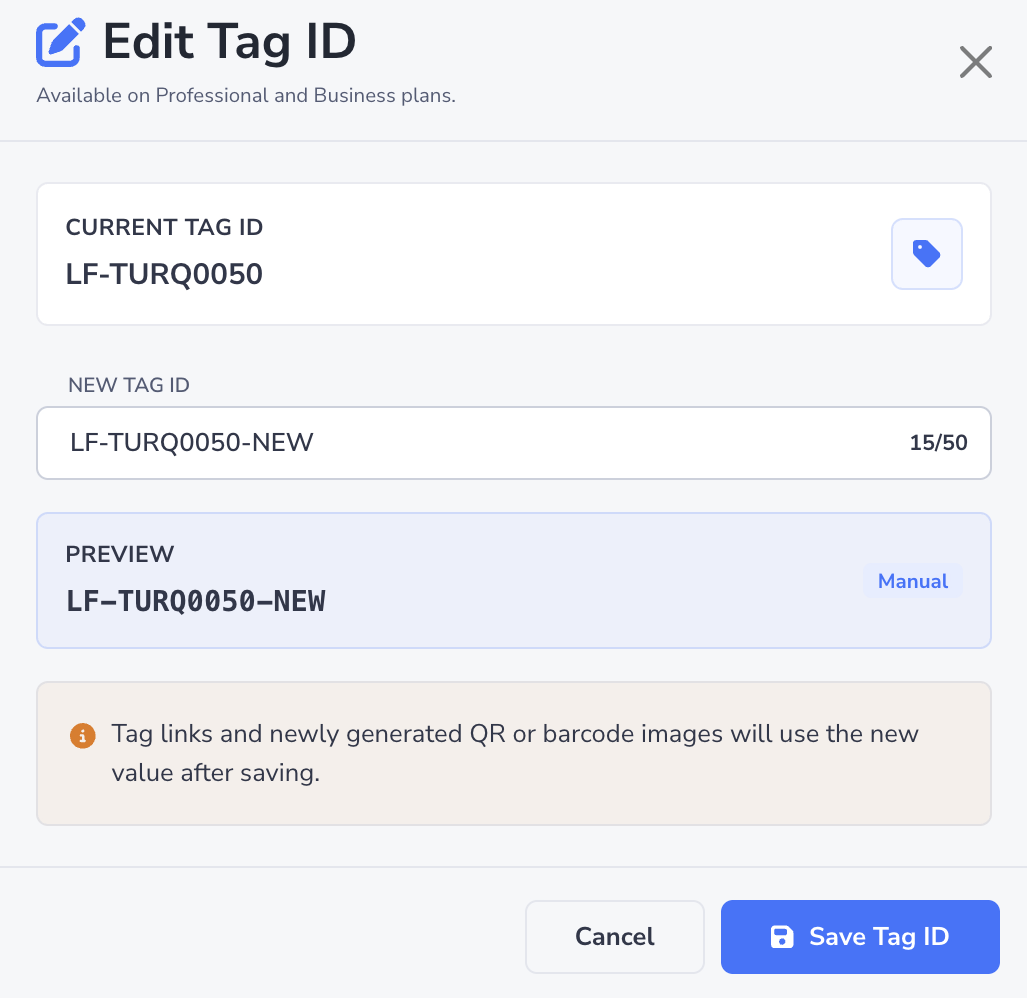
Manual tag IDs still need to be unique and cannot be longer than 50 characters. This feature is not available on the Starter or Professional plans, and users with the Member role cannot edit tag IDs manually.
If the lot is linked to Shopify, the next Products and stock push uses the edited Tag ID as its SKU. The Title option uses the lot's Product Label, falling back to the Tag ID when blank. Color can also appear in the displayed variant title. A Shopify push skips lots whose Tag ID is the placeholder -, longer than 50 characters, or contains a slash or control characters.
Best Practices
- Keep prefixes short so tag IDs remain easy to read on printed labels.
- Use product short names that your team can recognize quickly.
- Use manual tag ID editing only when a specific ID is required for your business process.
- Avoid changing prefixes often, because consistent IDs are easier to search, scan, and discuss across teams.
- Check connected app records before import so SKUs and external IDs are clean.
Next Steps
- Inventory QR & Barcode Tags: Learn how tag IDs appear on scannable QR and barcode tags.
- Inventory Management: Learn how inventory items are created, updated, and organized.
- Inventory Settings: Review tag ID prefixes and inventory setup rules.