Tally Prime
Integrations
Tally Prime bank import
Upload bank statements in Loupe Factory, review the extracted transactions, map them to Tally ledgers, and push clean vouchers into Tally Prime. This guide helps finance and operations teams reduce manual entry while keeping control over what gets posted to the books.
Wholesalers, manufacturers, and finance teams that use Tally Prime and need to process recurring bank statements.
Fewer hand-entered vouchers, cleaner ledger review, and faster bank reconciliation.
Statement totals, transaction rows, counterparties, ledgers, voucher types, and final entries in Tally.
Why use Loupe Factory for Tally bank imports
Tally Prime includes native bank statement import and reconciliation tools for supported banks and supported file formats. That workflow works well when the statement export from your bank matches what Tally expects.
Many teams still run into a common gap: banks often provide statements as PDFs, or in formats that need cleanup before Tally can import them. Copying rows from a PDF into a spreadsheet can create merged cells, split descriptions, text amounts, inconsistent dates, and missing debit or credit columns. Those issues slow down voucher creation and make reconciliation harder.
Loupe Factory gives your team a review layer before anything reaches Tally. You can upload a statement, inspect extracted rows, map counterparties to the right ledgers, confirm voucher types, and then push approved vouchers into the selected Tally company.
Native Tally import vs Loupe Factory import
| Scenario | Use native Tally import | Use Loupe Factory |
|---|---|---|
| Your bank and file format are already supported in Tally | Yes | Optional |
| Your statement is an unprotected PDF | No | Yes |
| Your bank export needs cleanup before posting | Maybe | Yes |
| You want an AI-assisted transaction review before vouchers are created | No | Yes |
| You need staff to review ledger mapping before accounting posts entries | Maybe | Yes |
| You want to push reviewed Receipt, Payment, and Contra vouchers to Tally | Maybe | Yes |
Before you begin
- Make sure Tally or Tally Prime is installed and open on the computer that will receive the vouchers.
- Select the correct Tally company before you push anything from Loupe Factory.
- Keep the correct Bank Ledger Name ready. The spelling should match the ledger in Tally.
- Prepare an unprotected PDF bank statement from your bank.
- Confirm that your team has a consistent chart of accounts for customers, suppliers, banks, fees, taxes, and internal transfers.
- If you work across countries or currencies, confirm the accounting treatment with your finance team before posting. Loupe Factory helps prepare and push vouchers, but your Tally company settings still control local accounting rules.
Step 1: Install the local connector
Loupe Factory uses a local connector so approved vouchers can reach the Tally instance running on your workstation.
- In Loupe Factory, go to Workflows > Integrations > Tally - Bank Import.
- Download the local connector script from that page.
- Run the script on the workstation you will use for imports.
- Keep the default connection details unless your team has a different local Tally setup.
If your team imports statements from more than one workstation, repeat this setup on each workstation.
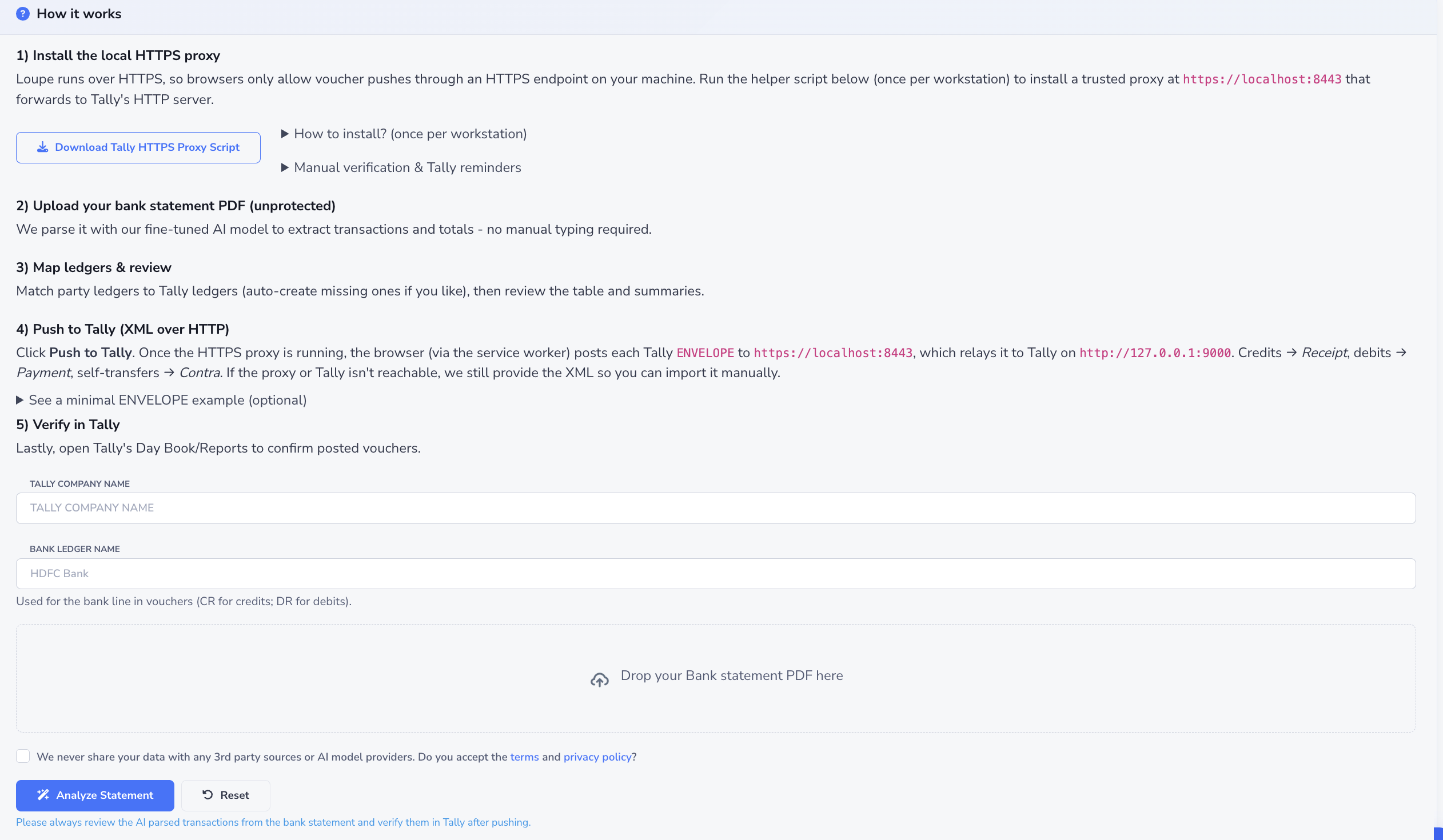
Step 2: Prepare Tally for the import
Before uploading the statement:
- Open Tally or Tally Prime.
- Select the destination company that should receive the vouchers.
- Confirm that the bank ledger already exists in Tally.
- Keep Tally open while you review and push the import from Loupe Factory.
If you select the wrong company or ledger, stop before pushing vouchers. Change the Tally company or update the details in Loupe Factory, then review the import again.
Step 3: Upload the bank statement
- On the Tally import page in Loupe Factory, enter the Tally Company Name.
- Enter the Bank Ledger Name exactly as it appears in Tally.
- Upload the bank statement PDF.
- Wait for Loupe Factory to parse the statement and prepare the review.
After upload, Loupe Factory shows statement-level context and the extracted transaction rows. Review the total credits, total debits, opening or closing balance if available, and transaction count before you inspect individual rows.
Step 4: Review extracted transactions
Review the statement data before mapping ledgers. This catches extraction or statement-quality issues before they become accounting cleanup.
Check each row for:
- transaction date
- banker's date or value date, if available
- description or narration
- debit or credit amount
- instrument number, reference number, UTR, check number, or transfer ID
- counterparty or party name
- running balance, if included in the statement
If the statement has repeated page headers, split descriptions, scanned text, currency symbols inside amount fields, or inconsistent date formats, review the rows more carefully before pushing. These are the issues that usually make manual PDF to spreadsheet conversion unreliable.
Step 5: Map ledgers and voucher types
After the extracted rows look correct, map each transaction to the right Tally ledger.
- Match each customer, supplier, bank, fee, tax, or internal account to the correct Tally ledger.
- Confirm the voucher type suggested for each transaction.
- Mark transfers between your own bank accounts as internal transfers where applicable.
- Fix any row that needs a different counterparty, voucher type, ledger, or reference.
- Ask your finance owner to review unfamiliar counterparties before posting.
Consistent ledger names make future imports faster. If your team uses different names for the same party across branches, locations, or countries, standardize the ledger naming before month end.
Step 6: Push vouchers to Tally
- When the review looks correct, select Push to Tally.
- Wait for the import to finish.
- Open the relevant Tally report, such as the Day Book or bank ledger, and verify the new vouchers.
- Resolve any failed or rejected rows before importing the next statement.
Do not skip the final Tally review. Loupe Factory helps prepare clean vouchers, but Tally remains the accounting system of record.
What gets mapped
| Source information | Loupe Factory review field | Tally result |
|---|---|---|
| Statement date | Transaction date | Voucher date |
| Value date or banker's date | Banker's date | Bank date or reconciliation detail |
| Transaction description | Description or narration | Voucher narration |
| Debit amount | Debit | Payment voucher line |
| Credit amount | Credit | Receipt voucher line |
| Counterparty name | Counterparty | Party ledger |
| Instrument or transfer reference | Instrument number or bank reference | Voucher reference detail |
| Own-account transfer marker | Self transfer flag | Contra voucher suggestion |
Voucher behavior
Loupe Factory follows a simple voucher pattern when preparing entries for Tally:
| Transaction type | Typical Tally voucher type | Common use case |
|---|---|---|
| Credit into the bank account | Receipt | Customer payment, refund received, interest income |
| Debit from the bank account | Payment | Supplier payment, bank charge, operating expense |
| Transfer between your own accounts | Contra | Movement between company bank or cash accounts |
Some businesses may need journal entries or specialized voucher handling for tax, foreign exchange, payroll, financing, or intercompany transactions. Review those cases with your accountant before posting.
Reconcile after posting
After vouchers are pushed:
- Open the bank ledger or Bank Reconciliation view in Tally.
- Compare the bank statement rows with the vouchers created from Loupe Factory.
- Investigate unmatched entries, amount mismatches, missing references, or transactions that were already posted manually.
- Confirm the statement period is complete before closing the month.
For high-volume teams, reconcile in smaller batches instead of waiting until the full month is complete. This makes exceptions easier to trace.
Recommended monthly workflow
- Import one bank account and one statement period at a time.
- Review statement totals before row-level mapping.
- Keep ledger names consistent across customers, suppliers, and bank accounts.
- Push only reviewed transactions.
- Verify the vouchers in Tally before importing the next statement.
- Save internal notes for recurring exceptions, such as bank fees, payment gateway settlements, payroll, loan payments, and tax remittances.
Screenshot placeholder
Transaction review and ledger mapping
Add a screenshot here later showing the parsed transaction table, counterparty ledger mapping controls, voucher type review, and Push to Tally action.
Troubleshooting
| Issue | What to check |
|---|---|
| Loupe Factory cannot parse the statement | Confirm the PDF is not password protected, scanned too poorly, or missing transaction pages. |
| Totals do not match the bank statement | Check for skipped pages, repeated headers, split rows, and opening or closing balance rows that are not transactions. |
| A party maps to the wrong ledger | Update the counterparty mapping before pushing. Use consistent party names across future imports. |
| Vouchers went to the wrong Tally company | Stop importing, review the selected company in Tally, and ask your accounting owner how to correct the entries. |
| A transaction was already entered manually | Do not post a duplicate voucher. Reconcile the manual entry against the bank statement instead. |
| Currency or tax treatment is unclear | Confirm the accounting treatment in Tally before pushing the voucher. |
Next steps
- Keep this guide available for the person who performs weekly or monthly bank imports.
- Review the pushed entries in Tally as part of your normal bank reconciliation process.
- Return to Integrations if your team also wants Shopify or QuickBooks setup guidance.